Thursday, March 3, 2011

Real world JavaScript performance mess

For a change, a post that is neither a rant nor a joke. Yes, I can hear people leaving already...

Well, I wanted to show a funny fact about JavaScript performance in a real-world case. The task is quite simple. I have a ul with 1549 (!) li elements, each with a unique id. I want to show only those whose id contains a certain substring (instant search).

For this task I have two candidates, either using jQuery selectors or "manually" filtering the list. The code is as below:

$(field_search).parents(".search_realm").find(".search_item").each(function(){
    if(this.id.indexOf(text) == -1){
        $(this).hide();
    } else {
        $(this).show();
    }
});


The jQuery option is:
$(field_search).parents(".search_realm").
            find(".search_item[id*="+text+"]").show();
$(field_search).parents(".search_realm").
            find(".search_item:not([id*="+text+"])").hide();

As you can see, it's not that complicated. Of course, suggestions accepted ;)

Now let's see the results (Hide/Show) in ms, averaged over multiple runs:
Manual         jQuery       [Browser Version]
Firefox Linux:   510/810        350/750      3.6.13
Firefox WinXP:   240/589        114/550      3.6.13
Chromium Linux: 1680/14320       35/14600    9.0.597.94
Chrome WinXP:   2340/12500       60/12600    9.0.597.107
IE7:             320/320        410/3000     7.0.5730.13

jQuery version: 1.4.4, 1.5.1 (minified)

That's right, no typos there. Weird facts:
  1. Chrome is slower than firefox in 3 out of 4 cases, 2 of them being a trainwreck case.
  2. Showing the previously hidden li elements takes significantly longer than the opposite except in IE7, manual method. In Chrome showing things back takes 10x more time, 500x (!) jQuery case.
  3. jQuery makes it slighty faster for Firefox, variable on Chrome, slower on IE7.
  4. Firefox on Windows is faster than on Linux. For Chrome results are mixed.
  5. Chrome is both the best and worst performer, by an order of magnitude in both cases.
  6. IE7 is capable of the fastest time to show the elements back, Chrome the slowest. Firefox is neither, but it's the best on average.
The performance fight is far from being over...

Update: In the end, after some hacks, Chrome wins the battle...

Tuesday, February 1, 2011

Alert levels

I found this text on many sites, I don't know who the original author is. It is however, very funny :D (No offence intended to any nationality)


Different Threat Levels in different countries:

The English are feeling the pinch in relation to recent terrorist threats and have therefore raised their security level from "Miffed" to "Peeved."


Soon, though, security levels may be raised yet again to "Irritated" or even "A Bit Cross." The English have not been "A Bit Cross" since the blitz in 1940 when tea supplies nearly ran out. Terrorists have been re-categorized from "Tiresome" to "A Bloody Nuisance." The last time the British issued a "Bloody Nuisance" warning level was in 1588, when threatened by the Spanish Armada.


The Scots have raised their threat level from "Pissed Off" to "Let's get the Bastards." They don't have any other levels. This is the reason they have been used on the front line of the British army for the last 300 years.


The French government announced yesterday that it has raised its terror alert level from "Run" to "Hide." The only two higher levels in France are "Collaborate" and "Surrender." The rise was precipitated by a recent fire that destroyed France 's white flag factory, effectively paralyzing the country's military capability.


Italy has increased the alert level from "Shout Loudly and Excitedly" to "Elaborate Military Posturing." Two more levels remain: "Ineffective Combat Operations" and "Change Sides."


The Germans have increased their alert state from "Disdainful Arrogance" to "Dress in Uniform and Sing Marching Songs." They also have two higher levels: "Invade a Neighbor" and "Lose."


Belgians, on the other hand, are all on holiday as usual; the only threat they are worried about is NATO pulling out of Brussels .


The Spanish are all excited to see their new submarines ready to deploy. These beautifully designed subs have glass bottoms so the new Spanish navy can get a really good look at the old Spanish navy.


Australia , meanwhile, has raised its security level from "No worries" to "She'll be alright, Mate." Three more escalation levels remain: "Crikey!", "I think we'll need to cancel the barbie this weekend" and "The barbie is cancelled." So far no situation has ever warranted use of the final
escalation level.

Saturday, December 18, 2010

Easy ssh

Another note-to-self post. This time how to set up ssh in order to connect easily to many computers.

Instead of doing:

[user@localhost ~]$: ssh remotename@remote.subdomain.domain.tld
remotename@remote.subdomain.domain.tld's password: ************
[remoteusername@remote ~]$:


We can do just:
[user@localhost ~]$: ssh remote
[remoteusername@remote ~]$:

And still have all the security provided by ssh. This is how:

First, create an asymmetric key pair.

[user@localhost ~]$: ssh-keygen -b 4096


That's right, 4096 bit key. Just because we can. The we create a configuration file for the destination server (the one we want to log to):

[user@localhost ~]$: $EDITOR ~/.ssh/config
Host SHORT_NAME_FOR_REMOTE_HOST*
User USERNAME_ON_REMOTE_HOST
Hostname FULL_NAME_OF_REMOTE_HOST.DOMAIN.TLD


Then we copy the public portion of the key to the remote host.

[user@localhost ~]$: scp ~/.ssh/id_rsa.pub SHORT_NAME:~/.ssh/authorized_keys


Of course, if the file already exists on the remote host we should copy our file to a temporal place, then log in the host and append it to the original with 'cat tempfile >> ~/.ssh/authorized_keys'.

Last step: log in without effort!

Friday, December 10, 2010

Ok, seriously?

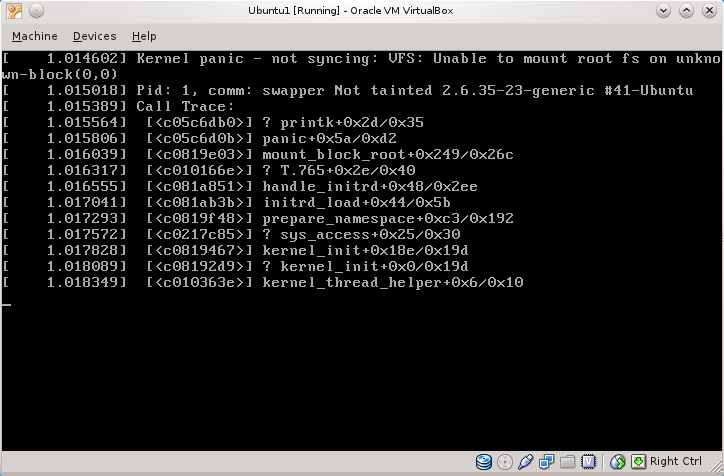
Something must be wrong: karma, a disturbance in the force, the economic crisis or something similar. There really is no distribution out there that would be easy and work out of the box without giving headaches?

Someone could say: Ubuntu! Is great! I love it! Ok, let's give it a try.

Download iso, start a VM, install, configure, reboot, update...


Wait... what? Well, at least it gives a solution. They COULD HAVE said that you need to run it as f*ckin' admin (it's for 'human beings", remember?), but let's add the 'sudo' for free. And...


O, rly? How am I supposed to recommend Ubuntu to my non-technical friends? Is this their concept of "user-friendly"?

Thanks for watching.

UPDATE:
Ok, I deleted the mentioned file in cache and updated again. It seemed to work. I installed Yakuake and virtualbox-guest-modules, rebooted, and...


No comments.

Thursday, December 9, 2010

Plane Prank

This is a nice "how to" if you want to scare the crap out of that annoying person sitting next to you on a plane.
1. Take your laptop out of the bag
2. Open it veeery slowly
3. Turn it on
4. Make sure the person is looking at your screen
5. Start your favourite browser
6. Close your eyes and turn your head up
7. Take a deep breath and open this website:
8. Look at the person's face.

I would add:
6.5: start mumbling something that sounds arabic.
9: LOL :D
10 (if you are flying to/in the states): get arrested by the TSA ;)


Source

Tuesday, December 7, 2010

Note to self: why I use Arch.

Long time no see! It's been a long time since I posted last time. Facebook and twitter usually are enough for the occasional rant, but this deserved a special mention.

So, I leave this here in case at some point in the future I doubt why, oh why, I use Arch when it takes so long to install. When you need to use the console for stuff. This is the reason:


Steps to reproduce: Install Fedora. Click System. Click Administration. Click Software update.

Well, it's just a bug, I should update... oh wait!

Thanks for watching.

Monday, March 1, 2010

PPPoE with German 1&1 (1und1)

Boring alert: I'm leaving this here just in case it's useful for someone. If you don't {live in Germany, have a 1und1 connection, want to use the Fritz!Box as a modem} you probably don't want to read this

Germany has very nice network coverage (at least compared to Spain). At home, I have a VDSL2 connection, 50Mbps downstream, 10Mbps upstream with 1&1. It includes some online movie rental, online storage, VoIP landline flatrate and a very fancy router to manage it all (FritzBox!Fon 7390), with Phone<->VoIP converter, dual radio WiFi, and lots of other stuff (even console access to the linux underneath, but you need to dial some stuff on a phone to get there, and I have no phone...)

The problem is that the bandwidth is a bit too much for this thing to handle. It manages very well web browsing, ftp upload and downloads and all sorts of usual navigation, but it chokes on BitTorrent usage. Even with just 400 connections it freezes after a few hours, requiring a reboot.

Solution? The web interface allows to use it just as a modem, with a very handy option just in the menu! I have the "advanced options" (Einstellungen>Ansicht>Expertenansicht) active, maybe it's not possible without it. Kudos to Fritz, the firmware might have some bugs / stability problems but their attitude is great. They give the user complete control over the hardware and it looks like they really care about the customer (when I reported another bug I got to talk with a technician after just one email exchange with some operator).

Problem? Of course there is one! It wouldn't be funny without it! After following the super-easy PPPoE guide it wouldn't work. Looking at /var/log/errors.log it said something about an authentication error, and the PAP protocol error was "profile not sufficient". Weird, huh? After some googling it turns out that the credentials 1&1 gives you to connect are not complete. They are in the form 1und1/USERNAME@online.de but the real PPPoE username is ONELETTER1und1/(SOMESTUFF)USERNAME@online.de.

How to find out the first letter and the stuff inside the parens? Maybe you could call 1&1 but if your german is not that... well, german, you can find it out with a packet capture. Yes, a packet capture, of the original PPPoE handshake. No, I'm no kidding. No, you don't need and specialized DSL-sniffing gizmo. Just go to http://ROUTER_IP/html/capture.html, force a reconnect from the main webpage and you just captured the handshake on the DSL interface.

Really really nice job, Fritz, I am impressed. Arguably "lucky for us", the PAP authentication is in clear text, so just get the full username, and put it in the peer file, in the pap-secrets, and you are good to go! The linux box will have a public IP so don't forget a firewall and turning everything you don't need off.