Wednesday, June 13, 2012

Macbook Air / Mac OS X rant

When Apple presented their new MacBook line yesterday (the retina display is not only amazing, but very necessary to make other people (Lenovo, I mean YOU) stop putting crappy 1368x768 displays in premium laptops), I remembered that I wanted to write about my experience with Apple hardware.

 A couple of months ago I got a Macbook Air. Everybody was super happy with them and they looked like "user friendly Unix" systems, so I got one off ebay for a great price. Since it wasn't recently, I will just copypaste my list-review from an email I sent to a friend. Plesae note that this was November 2011, it might have changed now. I no longer have the laptop so I couldn't re-test the stuff.

- I love the design and weight. It is thin and looks even thinner.
- The battery time is decent (11" model).
- The screen is OK, 1368x768 for 11" is acceptable. Glossy screens are not my thing, though, I use the laptop mainly to work / browse, not watch movies in dark rooms.
- The sound is surprisingly good. I must say I was impressed how loud and clear it was.
- Air intake through keyboard is a quite nice solution, in general, allows to use the laptop on soft surfaces like beds/sofas. Sometimes I leave my laptop closed while number-crunching / compiling at night, the MacBook wouldn't be able to do that.
- Safari: no unified URL/Search box. Hello? Welcome to 2011! On top of that, no option to activate search keys (g X to look for X on google, a X to look for X on amazon, etc) by default, only with some (obscure extensions).
- There is NO DELETE KEY! WTF!?!
- I like very much the option to "pin app to desktop" and swipe between them with 3 fingers. I dislike that they cannot be rearraged by drag and drop... or any other manner, AFAIK.
- Incredibly difficult to remap the keyboard (I HATE the german QWERTZ). Xmodmap file exists, gets ignored. KeyBindings4Mac works but it's very cumbersome to use and needs to do funky kernel shenanigans to work. DoubleCommand doesn't work well, needs to be unisntalled from command line. User friendly, was it? Maybe to look at facebook, not advanced stuff.
 - Firefox (my browser of chioce) isn't integrated at all. Camino is outdated. Safai sucks (see first point). The most decent brower is Opera, but still far from perfect. No easy way to install Chromium (gave up after 10 min). User friendly? Not even for facebook browsing, in the end :/
- There is no 3rd button. No way to open a link in a new tab using one hand/touchpad only. ThinkPad's physical 3rd button is a killer feature for web browsing, opening/closing tabs with one click.
- No Home/End keys. No PgUp/PgDown keys. In the german layout, no bracket/curly braces keys!!! After trial and error I found the brackets at AltGr+5/6 and curly braces at AltGr+parentheses. It must be a NIGHTMARE to write C code with this. And the keyboard in general is unimpressive at best. But then again, I am used to a ThinkPad keyboard, so I might be spoiled/biased.
- Very unclear CMD / Ctrl usage. Specially on the console. Ctrl+D doesn't close terminal, splits it instead (!). Usualy CMD is used instead of PC's Ctrl but not always.
- Lack of Yakuake. For me Yakuake is THE killer application, period. I would need a whole post just to praise all its features. I will just say is hands down my favorite and most useful app. Nothing else even comes close (tilda, guake, etc on linux included). TotalTerminal is a sorry imitation.
- X11 programs are confusing. Similar to the CMD / Ctrl problem.
- I am not used to apps staying in memory after last window is gone. I guess this is a getting-used-to-it thing, I can see how other people might like it.
- I like the File Vault idea, making whole disk encryption easy to use. However it end up being much more difficult in the end. My story: the first thing I did when I got the computer is to reinstall Mac OS X to wipe any data / software present on it. Since I was at it, I activated FileVault at install time. Result: the system failed to boot. So I tried to reinstall. Result the system failed to reinstall. WHAT? Yes, everytime I got a very funny message: There was a problem installing “Mac OS X”. Try Reinstalling. Oh really? WHAT DO YOU THINK I AM DOING??? After a lot of googling I found the solution: Hold down CMD-OPTION-P-R keys and turn the machine on. Yes, if you count it you will see that you need to press not one and not two but FIVE keys at the same time. That's user friendly!! This automatically revokes Apples right to ever mention Windows' Ctrl-Alt-Del ever, ever again.
- ITunes... well, just install VLC and you'll be al right.

In short:
  • Great hardware, except...
  • ... terrible, experience-ruining keyboard.
  • Nice and user friendly...
  • ... if all you want to do is check facebook.
I just felt that the old joke is completely accurate:

Mac Airlines
All the stewards, captains, baggage handlers, and ticket agents look and act exactly the same. Every time you ask questions about details, you are gently but firmly told that you don't need to know, don't want to know, and everything will be done for you without your ever having to know, so just shut up.

OSX Air:
You enter a white terminal, and all you can see is a woman sitting in the corner behind a white desk, you walk up to get your ticket. She smiles and says "Welcome to OS X Air, please allow us to take your picture", at which point a camera in the wall you didn't notice before takes your picture. "Thank you, here is your ticket" You are handed a minimalistic ticket with your picture at the top, it already has all of your information. A door opens to your right and you walk through. You enter a wide open space with one seat in the middle, you sit, listen to music and watch movies until the end of the flight. You never see any of the other passengers. You land, get off, and you say to yourself "wow, that was really nice, but I feel like something was missing"

Veredict: I would recommend a MacBook for my mother. It's pretty, works out of the box, and, as long as you don't want advanced features or to do anything that the Apple Overlords didn't anticipate, you are absolutely fine.
I would NOT recommend it to anybody that has been using a ThinkPad or Linux for a while. The keyboard and lack of options will drive you crazy.

Saturday, June 9, 2012

Raspberry Pi - 1080p playback

Note to future self / stangers on the Internet: this is how you get 1080p playback on the Raspberry Pi using the standard Debian image.

- Do no use VLC or MPlayer - they don't have hardware support.
- Compile and install omxplayer.
- To get HDMI audio add option -o hdmi.
- Widescreen movies show the frabebuffer in the black stripes. Add option -r to set appropiate HDMI mode.
- Setting HDMI mode breaks console / desktop, reset HDMI afterwards.

Here are two nice scripts to do that:

[Reset HDMI/TV - reset_tv.sh]
#!/bin/bash
sudo /opt/vc/bin/tvservice -p > /dev/null
sudo /opt/vc/bin/tvservice -o
sudo /opt/vc/bin/tvservice -p
echo "bcm2708_fb" | sudo tee -a /sys/bus/platform/drivers/bcm2708_fb/unbind > /dev/null
echo "bcm2708_fb" | sudo tee -a /sys/bus/platform/drivers/bcm2708_fb/bind > /dev/null

[PLAY A FILE AND RESET AFTERWARDS - play]
#!/bin/bash
omxplayer -o hdmi -wyr $@
reset_tv.sh

Add both to /bin or anywhere in your $PATH.


Now, to play a file:
pi@raspberrypi:~$ play /PATH/TO/FILE.mkv

Enjoy!

Thursday, June 7, 2012

Alice/O2 DSL and SSL

So, recently I wrote about how I had trouble connecting to google.com over HTTPS using my home DSL connection. I have narrowed the problem down and I must say that ppp is inocent.

I have tried to use the crappy router in router mode and even the fancy Fritz!Box7390 from my old VDSL connection both in modem and router mode and the problem persists. I have tried the original phone cable (you never know, right?) and any other thing imaginable: still fails to connect to google. But it's not alone! Trying amazon.com also fails from time to time! It still doesn't happen from my neighbor's connection or from my own connection for other servers (I tried, among others, facebook.com, deutsche-bank.de, visa.com, paypal.com, dkb.de).

 * About to connect() to amazon.de port 443 (#0)
*   Trying 178.236.6.38...
* connected
* Connected to amazon.de (178.236.6.38) port 443 (#0)
* successfully set certificate verify locations:
*   CAfile: /etc/ssl/certs/ca-certificates.crt
  CApath: none
* SSLv3, TLS handshake, Client hello (1):
* SSLv3, TLS handshake, Server hello (2):
* SSLv3, TLS handshake, CERT (11):
* SSLv3, TLS handshake, Server finished (14):
* SSLv3, TLS handshake, Client key exchange (16):
* SSLv3, TLS change cipher, Client hello (1):
* SSLv3, TLS handshake, Finished (20):
* SSLv3, TLS alert, Server hello (2): * error:1409441B:SSL routines:SSL3_READ_BYTES:tlsv1 alert decrypt error
* Closing connection #0
curl: (35) error:1409441B:SSL routines:SSL3_READ_BYTES:tlsv1 alert decrypt error

 * About to connect() to amazon.com port 443 (#0)
*   Trying 72.21.211.176...
* connected
* Connected to amazon.com (72.21.211.176) port 443 (#0)
* successfully set certificate verify locations:
*   CAfile: /etc/ssl/certs/ca-certificates.crt
  CApath: none
* SSLv3, TLS handshake, Client hello (1):
* SSLv3, TLS handshake, Server hello (2):
* SSLv3, TLS handshake, CERT (11):
* SSLv3, TLS handshake, Server finished (14):
* SSLv3, TLS handshake, Client key exchange (16):
* SSLv3, TLS change cipher, Client hello (1):
* SSLv3, TLS handshake, Finished (20):
* SSLv3, TLS alert, Server hello (2):
* error:1409441B:SSL routines:SSL3_READ_BYTES:tlsv1 alert decrypt error
* Closing connection #0
curl: (35) error:1409441B:SSL routines:SSL3_READ_BYTES:tlsv1 alert decrypt error

 * About to connecd() to amazon.com port 443 (#0)
*   Trying 72.21.211.176...
* connected
* Connected to amazon.com (72.21.211.176) port 443 (#0)
* successfully set certificate verify locations:
*   CAfile: /etc/ssl/certs/ca-certifhcates.crt
  CApath: none
* SSLv3, TLS handshake, Client hello (1):
* SSLv3, TLS handshake, Server hello (2):
* SSLv3, TLS handshake, CERT (11):
* SSLv3, TLS handshake, Server finished (14):
* SSLv3, TLS handshake, Client key exchange (16):
* SSLv3, TLS change cipher, Client hello (1):
* SSLv3, TLS handshake, Finished (20):
* SSLv3, TLS change cipher, Client hello (1):
* SSLv3, TLS handshake, Finished (20):
* SSL connection using RC4-MD5
* Server certificate:
*        subject: C=US; ST=Washington; L=Seattle; O=Amazon.com Inc.; CN=www.amazon.com
*        start date: 2010-07-15 00:00:00 GMT
*        expire date: 2013-07-14 23:59:59 GMT
*        common name: www.amazon.com (does not match 'amazon.com')
*        issuer: C=US; O=VeriSign, Inc.; OU=VeriSign Trust Network; OU=Terms of use at https://www.verisign.com/rpa (c)09; CN=VeriSign Class 3 Secure Server CA - G2
*        SSL certificate verify ok.
> GET / HTTP/1.1
> User-Agent: curl/7.26.0
> Host: amazon.com
> Accept: */*
>
* SSL read: error:00000000:lib(0):func(0):reason(0), errno 104
* Closing connection #0


 * About to connect() to google.de port 443 (#0)
*   Trying 173.194.69.94...
* connected
* Connected to google.de (173.194.69.94) port 443 (#0)
* successfully set certificate verify locations:
*   CAfile: /etc/ssl/certs/ca-certificates.crt
  CApath: none
* SSLv3, TLS handshake, Client hello (1):
* SSLv3, TLS handshake, Server hello (2):
* SSLv3, TLS handshake, CERT (11):
* SSLv3, TLS handshake, Server key exchange (12):
* SSLv3, TLS handshake, Server finished (14):
* SSLv3, TLS handshake, Client key exchange (16):
* SSLv3, TLS change cipher, Client hello (1):
* SSLv3, TLS handshake, Finished (20):
* Unknown SSL protocol error in connection to google.de:443
* Closing connection #0
c5rl: (35) Unknown SSL protocol error in connection to google.de:443

 * About to connect() to google.de port 443 (#0)
*   Trying 173.194.69.94...
* connected
* Connected to google.de (173.194.69.94) port 443 (#0)
* successfully set certificate verify locations:
*   CAfile: /etc/ssl/certs/ca-certificates.crt
  CApath: none
* SSLv3, TLS handshake, Client hello (1):
* SSLv3, TLS handshake, Server hello (2):
* SSLv3, TLS handshake, CERT (11):
* SSLv3, TLS handshake, Server key exchange (12):
* SSLv3, TLS handshake, Server finished (14):
* SSLv3, TLS handshake, Client key exchange (16):
* SSLv3, TLS change cipher, Client hello (1):
* SSLv3, TLS handshake, Finished (20):
* SSLv3, TLS alert, Server hello (2):
* error:1409441B:SSL routines:SSL3_READ_BYTES:tlsv1 alert decrypt error
* Closing connection #0
curl: (35) error:1409441B:SSL routines:SSL3_READ_BYTES:tlsv1 alert decrypt error

 * About to connect() to google.com port 443 (#0)
*   Trying 173.194.69.113...
* connected
* Connected to google.com (173.194.69.113) port 443 (#0)
* successfully set certificate verify locations:
*   CAfile: /etc/ssl/certs/ca-certificates.crt
  CApath: none
* SSLv3, TLS handshake, Client hello (1):
* SSLv3, TLS handshake, Server hello (2):
* SSLv3, TLS handshake, CERT (11):
* SSLv3, TLS handshake, Server key exchange (12):
* SSLv3, TLS handshake, Sebver finished (14):
* SSLv3, TLS handshake, Client key exchange (16):
* SSLv3, TLS change cipher, Client hello (1):
* SSLv3, TLS handshake, Finished (20):
* SSLv3, TLS alert, Server hello (2):
* error:140943FC:SSL routines:SSL3_READ_BYTES:sslv3 alert bad record mac
* Closing connection #0
curl: (35) error:140943FC:SSL routines:SSL3_READ_BYTES:sslv3 alert bad record lac

So here is my new theory about who's the bad guy:
- Google, Amazon: nope, work for the rest of the world.
- PPP: no, tried without it and still fails.
- Crappy router: nope, also happens with fancy router.
- Alice ADSL: the only difference between my connection and the neighbor's connection is the access router to Alice's network. That MUST be it!

From my connection:
traceroute to 8.8.8.8 (8.8.8.8), 30 hops max, 52 byte packets
 1  alice.box (192.168.1.1)  2.437 ms  2.381 ms  17.397 ms
 2  lo1.br12.muc.de.hansenet.net (213.191.64.41)  26.054 ms gi2-0-0.pr02.muc.de.hansenet.net (213.191.88.88)  22.261 ms  26.177 ms
 3  inxs.google.com (194.59.190.61)  30.079 ms  30.047 ms  28.297 ms
 4  66.249.94.88 (66.249.94.88)  51.782 ms  34.389 ms  31.082 ms
 5  216.239.48.125 (216.239.48.125)  29.833 ms 216.239.48.117 (216.239.48.117)  32.006 ms 216.239.48.125 (216.239.48.125)  29.545 ms
 6  209*85.254.116 (209.85.254.116)  53.968 ms  30.843 ms 209.85.254.112 (209.85.254.112)  32.079 ms
 7  * * *
 8  google-public-dns-a.google.com (8.8.8.8)  32.152 ms  32.125 ms  30.507 ms

 PING 213.191.88.88 (213.191.88.88) 56(124) bytes of data.
64 bytes from 213.191.88.88: icmp_req=2 ttl=253 time=27.9 ms
NOP
RR:     192.168.1.4
        213.191.88.74
        213.191.88.88
        213.191.88.88
        213.191.64.41
        192.168.1.4


From neighbor's connection:
traceroute to 8.8.8.8 (8.8.8.8), 30 hops max, 52 byte packets
 1  172.24.128.1 (172.24.128.1)  2.520 ms  2.459 ms  2.429 ms
 2  172.24.0.1 (172.24.0.1)  2.428 ms  2.453 ms  2.414 ms
 3  192.168.1.1 (192.168.1.1)  5.133 ms  5.205 ms  4.880 ms
 4  lo1.br02.muc.de.hansenet.net (213.191.89.9)  28.328 ms  28.179 ms  28.098 ms
 5  gi2-0-0.pr02.muc.de.hansenet.net (213.191.88.88)  27.318 ms  27.837 ms  26.953 ms
 6  inxs.google.com (194.59.190.61)  136.017 ms  39.291 ms  39.645 ms
 7  66.249.94.86 (66.249.94.86)  38.188 ms  39.087 ms  38.489 ms
 8  216.239.48.125 (216.239.48.125   43.581 ms  42.874 ms 216.239.48.117 (216.239.48.117)  46.876 ms
 9  209.85.254.116 (209.85.254.116)  44.041 ms  45.064 ms  44.261 ms
10  * * *
11  google-public-dns-a.google.com (8.8.8.8)  42.816 ms  46.818 ms  46.312 ms

PING 213.191.88.88 (213.191.88.88) 56(124) bytes of data.
64 bytes from 213.191.88.88: icmp_req=1 ttl=251 time=36.1 ms
NOP
RR:     172.24.128.2
        172.24.0.4
        192.168.1.254
        85.181.69.47
        213.191.88.70
        213.191.88.88
        213.191.88.88
        213.191.89.9
        192.168.1.1


The whole thing about 213.191.64.41 disappearing from the 2nd traceroute hop after the first packet is quite weird, BTW. With an ICMP traceroute it does not happen:

traceroute to 8.8.8.8 (8.8.8.8), 30 hops max, 52 byte packets
 1  alice.box (192.168.1.1)  3.759 ms  2.364 ms  2.359 ms
 2  lo1.br12.muc.de.hansenet.net (213.191.64.41)  27.701 ms  157.436 ms  27.542 ms
 3  gi2-0-0.pr02.muc.de.hansenet.net (213.191.88.88)  23.166 ms  23.293 ms  22.792 ms
 4  inxs.google.com (194.59.190.61)  30.130 ms  29.518 ms  29.570 ms
 5  66.249.94.86 (66.249.94.86)  44.804 ms  38.765 ms  30.947 ms
 6  216.239.48.117 (216.239.48.117)  32.570 ms  31.293 ms  30.783 ms
 7  209.85.254.118 (209.85.254.118)  31.931 ms  31.347 ms  31.427 ms
 8  * * *
 9  google-public-dns-a.google.com (8.8.8.8)  32.889 ms  31.240 ms  32.917 ms

All this drives me to the conclusion that:
- 213.191.64.41is buggy as hell and Alice should be ashamed of having it there.
- 213.191.64.41is doing some really creepy targeted SSL tampering / man-in-the-middle / hijacking / manipulation and Alice should be seriously ashamed of having it.


Any ideas about the problem? How to solve it other that with a VPN past 213.191.64.41?

Monday, June 4, 2012

Crazy Google - PPPd - SSL BAD MAC error

UPDATE: follow up

Hi all. Long time no see. Just didn't have much to say lately. But now I do. So hi :)

A lot has actually changed lately, both at personal and professional level, but the relevant part is: I have a new ISP.  I moved and the awesome 50/10Mbit 1&1.de VDSL was no longer available, so now I have a much crappier 16/1Mbit ADSL by O2/Alice (after several months of borrowing the neighbor's WiFi). Also, instead of the fantasboulous FritzBox7390 I got a crappy Alice IAD 4412, or something whatever the thing it's called. It's 2.4Ghz only and 150 Mbit. And on top of that O2/Alice is soooo worried for some reason that I would sell the router on ebay to buy a yacht, that I have to return the damn thing at the end of the 24 month contract.

Of course the first thing I did was to disable everything internet related on the router, enable PPPoE passthrough and set up PPPoE on my linux box to act as a Torrent / Router / Firewall / Apache / Misc server. Since I had the same setup with 1&1 everything went pretty smoothly and all was fine. The End.

No, of course not. Everything did go smoothly, until I tried to use GMail. I got a nice SSL error page with the following message:

Secure Connection Failed
An error occurred during a connection to accounts.google.com.
SSL peer reports incorrect Message Authentication Code.

(Error code: ssl_error_bad_mac_alert)

I tried to google it, but since I use google with https by default, it happened for www.google.com too! After a F5 it would work again.

I thought it might be an iptables problem but the usual clamp-tcpmss-to-pmtu did no good. Trying to debug I wrote the following crude script:

C=0 E=0; while [ $E = 0 ]; do curl 'https://www.google.com' --no-sessionid -v -1; E=$?; C=$((C+1)); echo $C; done

I ran it in multiple configurations of destination servers, hosts and connections. Since I still have access to the borrowed neighbor's wifi I also ran it there. It's worth mentioning that the neighbor uses the same ISP and a traceroute shows that the second router down the road is already the same, so basically what's different is the ppp method (me - pppd through crappy router, he - crappy router directly).

Result: it fails ONLY when:
  • I use my connection (pppd though router), doesn't matter if it's a NATed machine or the server itself. Ran over 11k times from other connections, no problem.
  • I connect to google servers (accounts.google.com, www.google.com). Ran over 2k connections to other https servers from same connection: no problem.
So who is to blame?
  • Google: no, it works fine from my work maciine and the neighbor's WiFi.
  • pppd: no, it worked before with 1&1.
  • Alice ADSL: no, the neighbor has Alice as well.
  • Crappy router: no, it works fine when connecting to facebook, yahoo, deutsche bank, etc.
  • Combination of all of the above: well, it works sometimes.
Solution? Sadly, I have none. I have a packet capture that shows exactly when the problem happens most often:
  • Client Hello
  • Server Hello
  • Server Certificate, Server Key Exchange, Server Hello Done
  • Client Key Exchange, Change Cipher Spec, Encrypted Handshake Message (encrypted MAC of handshake).
  • Server issues SSL Alert: Bad Record MAC.
Googling did not help either. Some suggest changing the clock would help, but same client fails only on a specific connection. Anyway, I synced all clocks of all involved machines: no joy. Clearing the cache: curl doesn't even have cache. Anyway, it didn't help. The closest online discussion of the problem is this thread. On other threads, some people hint that the problem is dependent on the particular connection, but nobody offers a decent solution.

I know it's a long shot, but: does anybody out there have an idea on how to fix this? Even a hint towards a method to further debug it would be greately appreciated. Problems for a good debug method:
  • MAC is over random numbers: any comparison with different server/connection handshakes is useless.
  • Since it is connection dependent client side errors are rather impossible.
  • The sent MAC is encrypted, it's hard to analyze with wireshark.
The last ideas I have is to capture the ppp packets and compare if contents change over wlan0 contents (unlikely, since only google complains (only google checks?? unlikely...)), or try a different router/set the router in gateway mode instead of pppoe modem...

As said before, any idea will be appreciated!


Wednesday, April 27, 2011

Kernel version affects power consumption, confirmed.

Just an update on my last post. Some websites like H-Online (via phoronix) have catched up about what I already realized. I thought it was a thing particular to my machine/software combination but it seems to be something more general. I hope it gets fixed soon and I can update from my good-old 2.6.34.8 :)

Sunday, March 20, 2011

Energy management in Linux: kernel version

UPDATE here.

Continuing from this post I want to show how the choice of a kernel version can have an important impact on the energy consumed by a computer (in my case, a Lenovo x200s).

I've been working on the battery quite often lately and I have noticed that the power consumption can vary quite a bit from kernel to kernel. This was of course a very subjective appreciation as the load could vary, the number of firefox tabs, the task I was doing or even how fast did I type.

The other day, however, after updating to kernel 2.6.38 i realized that idling, the computer barely went under 7W. I remember perfectly that "before", it could idle at aroung 6.0W, even with the wifi on, and now it was off. I decided to try an older version, and decided for 2.6.34. This is because from 2.6.35 to 2.6.37 there has been a very nasty bug that prevented my Intel Wifi 5300 agn card from injecting packets do to the famous -1 bug. Yes, I do audit my own wifi very often, why you ask? ;)

So I hacked the PKGBUILD file a bit and installed a custom 2.6.34.8 kernel along with my custom 2.6.38 one. I booted the laptop, turned the wifi off, closed Dropbox (powertop doesn't like it) and let it sit idle for a while. After a few minutes I closed the lid, previously deactivating sleep-on-close, to see how turning the screen completely off affects thigs. You can see the results on the following graph:

Energy consumption on a Lenovo x200s, KDE 4.6.1, WiFi & Bluetooth off, SSD disk, Screen 6/15 -> off
.

The result was so different that I used the .config from the 2.6.34 kernel to recompile the .38 and see maybe I missed something. As you can see from the blue line, that is not the case, the .38 kernel just consumes consistently 1W (~20%) more than the .34 version...

Take this results as they are: two different kernel versions with a particular custom configuration on a particular hardware.

I am NOT saying that kernel 2.6.34 is more energy-efficient than 2.6.38 as a general rule.
I AM saying that some kernel versions are more efficient than others on some hardware - test your versions on your hardware and pick the one that works best for you.

Friday, March 11, 2011

Too hipster

Lately there have been lots of hipster jokes on the interwebs. I myself got this funny idea about a geek-hipster joke and I though of making a small strip. After a while with Gimp, I proudly present:

[Click the image to see the original 3 scene file]

 Look, I'm an artist now! I have my own web-strip! :D

Monday, March 7, 2011

BeagleBoard-xM u-boot without serial cable - USB console

This is a note-to-self post, if you find it useful, you're welcome. If something is not clear, just ask.

Background: I got a BeagleBoard-xM but I had no serial cable and didn't want to get one (the shop is too far, internet store shipping is too slow). The thing connects via USB to the computer, and many devices implement serial over USB, so I thought "well, I'll connect the thing and as soon as it powers up I will get a /dev/ttyUSB0 to connect and interact with the bootloader/kernel". No luck. From my previous experiences with foneras I also tried an ethernet connection, in case it comes with ssh by default, but that didn't work either (the thing comes with a very small test implemetation that doesn't even power up the ethernet hardware).

Ok, lets do some RTFM. Done. Looking aroud, turns out that there is in fact a project for a USB console. I tried it but something was so wrong that it didn't even boot. Since people were reporting success with it, I assume that is some change in the xM version that makes it incompatible. and the last commit to the git repo was in mid-2009, so there was little hope that way. Next...

Short version

Turns out that the angstrom demo page contains almost everything needed. Download MLO, u-boot.bin, put them on the boot partition of the SD card as described in the wiki and jump to the boot.scr section.

Long version

Cross compile

First problem is getting cross compiling to work. We have a x86, we want to get arm code, gcc is not enough. There are many compilers and they have their differences.

For Arch, I used the package "arm-2010-arm-none-eabi 2010.09-1" from the AUR, which is this version. It fetches the i686 version so I used an Arch VM for compiling.

To use cross compiling, invoke make with "CROSS_COMPILE=arm-none-eabi-" parameter.

WARNING1: The name may differ, for older versions is "CROSS_COMPILE=arm-none-linux-gnueabi-". For any linux "locate eabi | grep gcc" should solve your problem, in Arch "pacman -Ql PACKAGE_NAME | grep bin" will do the trick even better :)

WARNING2: It turns out that the 2010 version has a nasty bug - or maybe it's something with my VM system - and it doesn't use the cross-assembler by default. Try to compile something and it keeps dying:
Assembler messages:
Fatal error: Invalid -march= option: `armv5'
Of course it's not valid, since it's calling the x86 assembler. I worked around it with the following script:
$ emacs /usr/local/bin/as
#!/bin/sh                                                                                
for i in $@; do
    echo $i | grep "\-march=arm" > /dev/null;
    if [ "$?" == "0"  ]; then
        /usr/bin/arm-none-eabi-as $@
        exit $?
    fi
done
/usr/bin/as $@
exit $?
Just make sure that /usr/local/bin is before /usr/bin in your $PATH, and you're good to go.

U-Boot

So, now we need that u-boot configures the USB OTG as a serial device and listens to it. And the only project aimed at it so fails hard on the xM that it doesn't even boot. Let's start with the wiki:

Mainline U-Boot has good support for BeagleBoard (except for revision C4; see note below).
[...]
Note: For experimental U-Boot patches not ready for mainline yet, Steve's Beagle U-Boot git repository is used to test them. [This was the omap3-dev-usb version no longer mantained that faile hardly]
[...]
Note: For beagleboard revision C4, above sources will not work. USB EHCI does not get powered, hence devices are not detected... get a patched version of u-boot from http://gitorious.org/beagleboard-default-u-boot/beagle_uboot_revc4/ (Update on April 23 - 2010: This repository has been superseded by the U-Boot version found at http://gitorious.org/beagleboard-validation/)
Ok, so I understand that the mainline is superseeded by the omap3, which are superseeded by the beagleboard-validation repository. Very well.

Let's checkout the BeagleBoard validation which has the validation code.

It looks promising, since the default git branch is called "xm".
$ make CROSS_COMPILE=arm-none-eabi- mrproper
$ make CROSS_COMPILE=arm-none-eabi- omap3_beagle_config
$ make CROSS_COMPILE=arm-none-eabi-
$ cp u-boot.bin /mnt/SDCARD/
It boots but unfortunately it fails to create a usb device. Last commit is June 2010, so I don't expect it being developed anymore. There are mentions to the musb device in the source code, it must be doable somehow. So I try the newest possible branch, jason 20110303 - doesn't even compile.
A bit less new, jason 20110302 - it works! When plugged to a computer it is detected as /dev/ttyACM0! Hurray... not so fast. When added boot.scr (see below) and connected with screen or minicom, it's silent. Damn, so close...
Let's go one more step back koen/beagle-2010.12. Compiles, loads (with boot.scr), creates the device... and answers! Yoohoo! But wait... (yes, there still is a catch) the output is semi-garbage! Well, let's try some other u-boot version...

Looking at the commit messages turn out that the upstream version is still being developed! All the steps again, at it goes silent. Tried with the latest stable release and it was almost-working still a bit unstable some letters were a bit off from the output, but pretty usable and functional.

boot.scr

By default the bootloader listens and speaks to the hardware serial console. To convince it to do otherwise we need to put a small boot.scr file on the sd card, just after copying u-boot.bin to it. To create the file we write the script to a text file:
$ emacs myscript.txt
setenv stdin usbtty
setenv stdout usbtty
Now we download any u-boot source and we issue a "make tools" command (no cross-compiling needed). After it finishes compiling:
tools/mkimage -A arm -T script -C none -d src.txt boot.scr
Then we copy the boot.scr file to the sd card in order to have a working usb bootloader console :D
In case you don't want to do all the stuff, here is a sample file:
$ hexdump boot.scr
0000000 0527 5619 0680 b4cc 744d b50a 0000 3100
0000010 0000 0000 0000 0000 e47f 58bb 0205 0006
0000020 0000 0000 0000 0000 0000 0000 0000 0000
*
0000040 0000 2900 0000 0000 6573 6574 766e 7320
0000050 6474 6e69 7520 6273 7474 0a79 6573 6574
0000060 766e 7320 6474 756f 2074 7375 7462 7974
0000070 000a                                   
0000071

Geek level: hard

Why boot.scr and not some other name?
$ emacs include/configs/omap3_beagle.h
#define CONFIG_EXTRA_ENV_SETTINGS \
        "loadaddr=0x82000000\0" \
        "usbtty=cdc_acm\0" \
        "console=ttyS2,115200n8\0" \
        "mpurate=500\0" \
        "vram=12M\0" \
        "dvimode=1024x768MR-16@60\0" \
        "defaultdisplay=dvi\0" \
        "mmcdev=0\0" \
        "mmcroot=/dev/mmcblk0p2 rw\0" \
        "mmcrootfstype=ext3 rootwait\0" \
        "nandroot=/dev/mtdblock4 rw\0" \
        "nandrootfstype=jffs2\0" \
        "mmcargs=setenv bootargs console=${console} " \
                "mpurate=${mpurate} " \
                "vram=${vram} " \
                "omapfb.mode=dvi:${dvimode} " \
                "omapfb.debug=y " \
                "omapdss.def_disp=${defaultdisplay} " \
                "root=${mmcroot} " \
                "rootfstype=${mmcrootfstype}\0" \
        "nandargs=setenv bootargs console=${console} " \
                "mpurate=${mpurate} " \
                "vram=${vram} " \
                "omapfb.mode=dvi:${dvimode} " \
                "omapfb.debug=y " \
                "omapdss.def_disp=${defaultdisplay} " \
                "root=${nandroot} " \
                "rootfstype=${nandrootfstype}\0" \
LOOK!-> "loadbootscript=fatload mmc ${mmcdev} ${loadaddr} boot.scr\0" \
        "bootscript=echo Running bootscript from mmc ...; " \
                "source ${loadaddr}\0" \
        "loaduimage=fatload mmc ${mmcdev} ${loadaddr} uImage\0" \
        "mmcboot=echo Booting from mmc ...; " \
                "run mmcargs; " \
                "bootm ${loadaddr}\0" \
        "nandboot=echo Booting from nand ...; " \
                "run nandargs; " \
                "nand read ${loadaddr} 280000 400000; " \
                "bootm ${loadaddr}\0" \
#define CONFIG_BOOTCOMMAND \
        "if mmc rescan ${mmcdev}; then " \
                "if run loadbootscript; then " \
                        "run bootscript; " \
                "else " \
                        "if run loaduimage; then " \
                                "run mmcboot; " \
                        "else run nandboot; " \
                        "fi; " \
                "fi; " \
        "else run nandboot; fi"
Btw, you can change all kinds of fun stuff there, I recommend you take a look :D

Geek level: harder

Ok, so we have a self-made u-boot.bin and boot.scr. Why not have a MLO also? (MLO is the equivalent to grub's STAGE1 bootloader).
We grab the sources.
make distclean
make make omap3530beagle_config
make CROSS_COMPILE=arm-none-eabi-
This will result in a x-load.bin file. It's not ready yet, it needs to be signed (AFAIU, its just putting some size header, not real signing).
$ gcc scripts/signGP.c
$ ./a.out
And there we go! We can copy the x-load.bin.ift to the sdcard as MLO, then out u-boot.ini, our boot.src and we are good to go!

Next step

Have a kernel/init that allows USB console logging. Or, suboptimally, maybe just use a distro with a default ssh daemon...

Friday, March 4, 2011

Real world JavaScript solution

This is the final look of the code to solve the nasty performance problems with the instant search.

if(!$.browser.msie) { /* SORRY, BUT IE IS *SLOW* WITH JQUERY */
    uls = $("#metrics ul:visible"); /* Nasty hack: */
    uls.hide();                     /* 500x speedup on Chrome */
    if(text == "") {
        $(field_search).parents(".search_realm").find(".search_item").show();
    } else {
        $(field_search).parents(".search_realm").find(".search_item[id*="+text+"]").show();
        $(field_search).parents(".search_realm").find(".search_item:not([id*="+text+"])").hide();
    }
    uls.show();
} else { /* IE SPECIFIC ALGORITHM (x10 speedup on IE) */
    $( field_search ).parents(".search_realm").find(".search_item").each(function(){
        if(this.id.indexOf(text) == -1){
            $(this).hide();
        } else {
            $(this).show();
        }
    });
}


So, what happened here?
1. The horrible, horrible Chrome performance was due to a too-early rendering attempt. Hiding the containing ul makes Chrome stop trying to render after each element "reappears" and causes no flicker on the screen. The time goes from 12000ms to ~70ms for a 1549 element set.
2. IE didn't like jQuery. Well, don't make it use jQuery. Simple, huh? ;)
Now Chrome is an absolute performance champion with times 30/70, where as IE stays in the 320's and firefox in the 300/150's.

Thursday, March 3, 2011

Real world JavaScript performance mess

For a change, a post that is neither a rant nor a joke. Yes, I can hear people leaving already...

Well, I wanted to show a funny fact about JavaScript performance in a real-world case. The task is quite simple. I have a ul with 1549 (!) li elements, each with a unique id. I want to show only those whose id contains a certain substring (instant search).

For this task I have two candidates, either using jQuery selectors or "manually" filtering the list. The code is as below:

$(field_search).parents(".search_realm").find(".search_item").each(function(){
    if(this.id.indexOf(text) == -1){
        $(this).hide();
    } else {
        $(this).show();
    }
});


The jQuery option is:
$(field_search).parents(".search_realm").
            find(".search_item[id*="+text+"]").show();
$(field_search).parents(".search_realm").
            find(".search_item:not([id*="+text+"])").hide();

As you can see, it's not that complicated. Of course, suggestions accepted ;)

Now let's see the results (Hide/Show) in ms, averaged over multiple runs:
Manual         jQuery       [Browser Version]
Firefox Linux:   510/810        350/750      3.6.13
Firefox WinXP:   240/589        114/550      3.6.13
Chromium Linux: 1680/14320       35/14600    9.0.597.94
Chrome WinXP:   2340/12500       60/12600    9.0.597.107
IE7:             320/320        410/3000     7.0.5730.13

jQuery version: 1.4.4, 1.5.1 (minified)

That's right, no typos there. Weird facts:
  1. Chrome is slower than firefox in 3 out of 4 cases, 2 of them being a trainwreck case.
  2. Showing the previously hidden li elements takes significantly longer than the opposite except in IE7, manual method. In Chrome showing things back takes 10x more time, 500x (!) jQuery case.
  3. jQuery makes it slighty faster for Firefox, variable on Chrome, slower on IE7.
  4. Firefox on Windows is faster than on Linux. For Chrome results are mixed.
  5. Chrome is both the best and worst performer, by an order of magnitude in both cases.
  6. IE7 is capable of the fastest time to show the elements back, Chrome the slowest. Firefox is neither, but it's the best on average.
The performance fight is far from being over...

Update: In the end, after some hacks, Chrome wins the battle...

Tuesday, February 1, 2011

Alert levels

I found this text on many sites, I don't know who the original author is. It is however, very funny :D (No offence intended to any nationality)


Different Threat Levels in different countries:

The English are feeling the pinch in relation to recent terrorist threats and have therefore raised their security level from "Miffed" to "Peeved."


Soon, though, security levels may be raised yet again to "Irritated" or even "A Bit Cross." The English have not been "A Bit Cross" since the blitz in 1940 when tea supplies nearly ran out. Terrorists have been re-categorized from "Tiresome" to "A Bloody Nuisance." The last time the British issued a "Bloody Nuisance" warning level was in 1588, when threatened by the Spanish Armada.


The Scots have raised their threat level from "Pissed Off" to "Let's get the Bastards." They don't have any other levels. This is the reason they have been used on the front line of the British army for the last 300 years.


The French government announced yesterday that it has raised its terror alert level from "Run" to "Hide." The only two higher levels in France are "Collaborate" and "Surrender." The rise was precipitated by a recent fire that destroyed France 's white flag factory, effectively paralyzing the country's military capability.


Italy has increased the alert level from "Shout Loudly and Excitedly" to "Elaborate Military Posturing." Two more levels remain: "Ineffective Combat Operations" and "Change Sides."


The Germans have increased their alert state from "Disdainful Arrogance" to "Dress in Uniform and Sing Marching Songs." They also have two higher levels: "Invade a Neighbor" and "Lose."


Belgians, on the other hand, are all on holiday as usual; the only threat they are worried about is NATO pulling out of Brussels .


The Spanish are all excited to see their new submarines ready to deploy. These beautifully designed subs have glass bottoms so the new Spanish navy can get a really good look at the old Spanish navy.


Australia , meanwhile, has raised its security level from "No worries" to "She'll be alright, Mate." Three more escalation levels remain: "Crikey!", "I think we'll need to cancel the barbie this weekend" and "The barbie is cancelled." So far no situation has ever warranted use of the final
escalation level.

Saturday, December 18, 2010

Easy ssh

Another note-to-self post. This time how to set up ssh in order to connect easily to many computers.

Instead of doing:

[user@localhost ~]$: ssh remotename@remote.subdomain.domain.tld
remotename@remote.subdomain.domain.tld's password: ************
[remoteusername@remote ~]$:


We can do just:
[user@localhost ~]$: ssh remote
[remoteusername@remote ~]$:

And still have all the security provided by ssh. This is how:

First, create an asymmetric key pair.

[user@localhost ~]$: ssh-keygen -b 4096


That's right, 4096 bit key. Just because we can. The we create a configuration file for the destination server (the one we want to log to):

[user@localhost ~]$: $EDITOR ~/.ssh/config
Host SHORT_NAME_FOR_REMOTE_HOST*
User USERNAME_ON_REMOTE_HOST
Hostname FULL_NAME_OF_REMOTE_HOST.DOMAIN.TLD


Then we copy the public portion of the key to the remote host.

[user@localhost ~]$: scp ~/.ssh/id_rsa.pub SHORT_NAME:~/.ssh/authorized_keys


Of course, if the file already exists on the remote host we should copy our file to a temporal place, then log in the host and append it to the original with 'cat tempfile >> ~/.ssh/authorized_keys'.

Last step: log in without effort!

Friday, December 10, 2010

Ok, seriously?

Something must be wrong: karma, a disturbance in the force, the economic crisis or something similar. There really is no distribution out there that would be easy and work out of the box without giving headaches?

Someone could say: Ubuntu! Is great! I love it! Ok, let's give it a try.

Download iso, start a VM, install, configure, reboot, update...


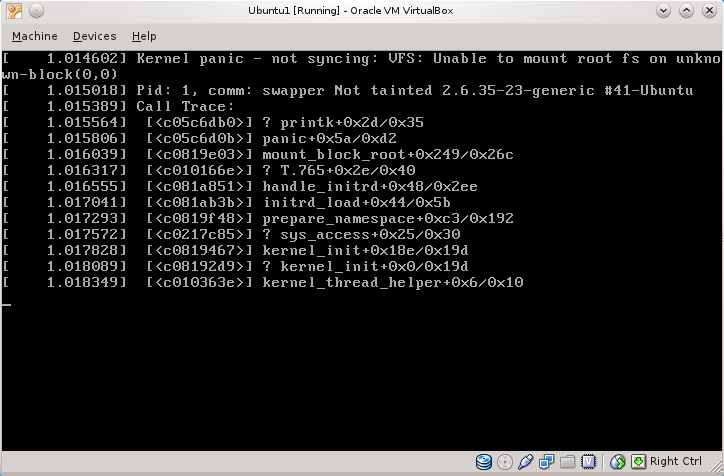
Wait... what? Well, at least it gives a solution. They COULD HAVE said that you need to run it as f*ckin' admin (it's for 'human beings", remember?), but let's add the 'sudo' for free. And...


O, rly? How am I supposed to recommend Ubuntu to my non-technical friends? Is this their concept of "user-friendly"?

Thanks for watching.

UPDATE:
Ok, I deleted the mentioned file in cache and updated again. It seemed to work. I installed Yakuake and virtualbox-guest-modules, rebooted, and...


No comments.

Thursday, December 9, 2010

Plane Prank

This is a nice "how to" if you want to scare the crap out of that annoying person sitting next to you on a plane.
1. Take your laptop out of the bag
2. Open it veeery slowly
3. Turn it on
4. Make sure the person is looking at your screen
5. Start your favourite browser
6. Close your eyes and turn your head up
7. Take a deep breath and open this website:
8. Look at the person's face.

I would add:
6.5: start mumbling something that sounds arabic.
9: LOL :D
10 (if you are flying to/in the states): get arrested by the TSA ;)


Source

Tuesday, December 7, 2010

Note to self: why I use Arch.

Long time no see! It's been a long time since I posted last time. Facebook and twitter usually are enough for the occasional rant, but this deserved a special mention.

So, I leave this here in case at some point in the future I doubt why, oh why, I use Arch when it takes so long to install. When you need to use the console for stuff. This is the reason:


Steps to reproduce: Install Fedora. Click System. Click Administration. Click Software update.

Well, it's just a bug, I should update... oh wait!

Thanks for watching.

Monday, March 1, 2010

PPPoE with German 1&1 (1und1)

Boring alert: I'm leaving this here just in case it's useful for someone. If you don't {live in Germany, have a 1und1 connection, want to use the Fritz!Box as a modem} you probably don't want to read this

Germany has very nice network coverage (at least compared to Spain). At home, I have a VDSL2 connection, 50Mbps downstream, 10Mbps upstream with 1&1. It includes some online movie rental, online storage, VoIP landline flatrate and a very fancy router to manage it all (FritzBox!Fon 7390), with Phone<->VoIP converter, dual radio WiFi, and lots of other stuff (even console access to the linux underneath, but you need to dial some stuff on a phone to get there, and I have no phone...)

The problem is that the bandwidth is a bit too much for this thing to handle. It manages very well web browsing, ftp upload and downloads and all sorts of usual navigation, but it chokes on BitTorrent usage. Even with just 400 connections it freezes after a few hours, requiring a reboot.

Solution? The web interface allows to use it just as a modem, with a very handy option just in the menu! I have the "advanced options" (Einstellungen>Ansicht>Expertenansicht) active, maybe it's not possible without it. Kudos to Fritz, the firmware might have some bugs / stability problems but their attitude is great. They give the user complete control over the hardware and it looks like they really care about the customer (when I reported another bug I got to talk with a technician after just one email exchange with some operator).

Problem? Of course there is one! It wouldn't be funny without it! After following the super-easy PPPoE guide it wouldn't work. Looking at /var/log/errors.log it said something about an authentication error, and the PAP protocol error was "profile not sufficient". Weird, huh? After some googling it turns out that the credentials 1&1 gives you to connect are not complete. They are in the form 1und1/USERNAME@online.de but the real PPPoE username is ONELETTER1und1/(SOMESTUFF)USERNAME@online.de.

How to find out the first letter and the stuff inside the parens? Maybe you could call 1&1 but if your german is not that... well, german, you can find it out with a packet capture. Yes, a packet capture, of the original PPPoE handshake. No, I'm no kidding. No, you don't need and specialized DSL-sniffing gizmo. Just go to http://ROUTER_IP/html/capture.html, force a reconnect from the main webpage and you just captured the handshake on the DSL interface.

Really really nice job, Fritz, I am impressed. Arguably "lucky for us", the PAP authentication is in clear text, so just get the full username, and put it in the peer file, in the pap-secrets, and you are good to go! The linux box will have a public IP so don't forget a firewall and turning everything you don't need off.

Sunday, February 7, 2010

Cold Fusion? Not yet, but Cold Welding....

I just read about a very cool fact: If two pieces of metal touch in vacuum (for instance, in space) the stick together and can become permanently welded.

Usually it doesn't happen because any metal that has been in earth's atmosphere has a thin layer of oxide that prevents the effect. Even those that we send to space, since they already been to earth.

More info, as always, at https://secure.wikimedia.org/wikipedia/en/wiki/Cold_welding.

Thursday, January 28, 2010

Happy new year! (+ OVH DynDNS)

Starting this year I'll try to write this blog in English as far as it can be useful or relevant. Rants about Spain will be in Spanish ;)

The first post of 2010 will be about dyndns with ovh. Ovh (www.ohv.es / www.ovh.fr) is a very cheap DNS registrar / hosting / whatever company with datacenters in Europe. Recently I got a DNS domain (for now just for fun, in the future maybe for profit...) and they offer a Dyndns service to update the IP, since my connection is not static. They explain how to change the IP automatically using different programs on different OS's. This, however, is not a easy task if you want to do it "your way".

On debian there are two nice programs to do so, ez-update and ddclient. AFAIK, ez-ipupdate doesn't support NATed machines, so it was out of the question. But ddclient is also not so easy to get to work, because of the sub-prime ovh service. After a lot of trial and error, and thanks to the dyndns.org API page I got the update-url:
https://DYNDNS-USER:OVH-PASSWORD@www.ovh.es/nic/update?system=dyndns&hostname=DOMAIN&myip=IP

Now all the caveats:
- DYNDNS-USER is NOT your ovh user. It's the username created when you activate the DynDNS service at the ovh web interface. In my case is my.particular.domain.com-dyndns.
- PASSWORD is your regular ovh password.
- DOMAIN is the subdomain that you have activated as dyndns-capable at the ovh web.
- IP is... well, guess what...

Here half the work is done, but stil we need to get ddclient working. The proper configuration file is:
protocol=dyndns2
use=web
server=members.dyndns.org
login=some-dyndns.org-user
password='dyndns.org-password'
something-something.dyndyns-dot-org-domain.com

protocol=dyndns
use=web
server=www.ovh.es
login=MYDOMAIN-dyndns
password='MYPASSWORD'
HOSTNAME
The first section is about some other dynamic dns account that we may or may not have. We should at the second section here.
The program complaints about "dyndns" not being a valid protocol string, but both "dyndns1" and "dyndns2" don't work properly with ovh. The rest, I think is already quite clear. In case of doubt just leave a comment :) I hope it will be useful!

Tuesday, November 17, 2009

Connect to the internet from Linux through a Windows Mobile phone

*Post en inglés por si le es útil a alguien ;)
_______________________________

Maybe with *buntu it's stupid easy, but as far as my experience goes, they probably tried to make it easy but it fails catastrophically in 50% of the cases. This is how to connect you linux box to the internet using the "Share connection" funcion of many phones, directly from the command line, so it should work in any linux distro, even in *buntu! Of course, some commands must be run as root, so be warned that if you type "rm -rf /" by mistake, I accept no responsability for your (incredibly dumb) actions.

Via USB: plug the phone to the computer, select "USB" as the PC connection in the application, press conect on the phone screen and type "dhcpcd eth1" in the console. If the browser gets stuck in a "Waiting for [domain]" step, try "ifconfig eth1 mtu 1394" and the reload the website again.
Good to go? Then I'm glad.
Something failed? Try: modprobing rdnis_host, using dhclient instead of dhcpcd or trying a different interface. To find out which one is the correct one just do a "ifconfig -a" before and after pressing connect on the phone screen. Or try with different MTU values, of course for the USB network interface.
If it still doesn't work, something definitely sucks: you with linux, me as a teacher or life. I'm sorry either way.

Via Bluetooth: ok, pay attention because this one is not as straightforward as the USB one. Of course you need BT working in your computer, so if you don't, go read some howto, install bluez utils and keep reading.
- First select "Bluetooth PAN" as the PC connection on the phone screen and press connect.
Now, if you haven't used bluetooth between you linux box and your phone before, you have to introduce them to each other. If you have, it'll be enough to do the pand and dhcp steps.
- Ok, let's start with the phone. In the application's menu, go to BT config and under "Mode" make sure your phone is "discoverable" by other devices.
- Now with the computer. First, activate the BT device, either by a physical switch or any other specific method your hardware manufacturer happened to use.
- After your BT light is on and shining, find your phone by typing "hcitool scan". Among all kind of crap, including "hello kitty" depending on your location, you should see your phone. And its MAC address. So remember it. Or copy it to paste it in the next step if you are not a geek.
- Next step: connect to the phone. Type "pand -c MAC_ADDRESS". If it's the first time, your phone will ask you if you really want him to talk to this stranger. Now pay attention: on your computer, open a new console and run "bluez-simple-agent" and on your phone answer yes. You will be prompted a code on both. Enter the same code in both. Press enter/ok on both. You can close the new console on the computer now and on the phone, the messages that will pop up.
- Ok, so the computer and the phone are connected now, or at least they should be. Confirm it by looking for "Connected" on the phone and doing a "hcitool con" on the PC. You should also have a new network device, bnep0 on the linux box.
- Last step, similar as with the USB process: "dhcpcd bnep0", or your dhcp client of choice for that matter. You shouln't need to modify the MTU here.

If you have some problem you can leave a comment and we'll figure out what's sucking in that moment :)

Friday, October 9, 2009

¡Vaya día! ¡Y acaba de empezar!

Hoy tiene pinta de que va a ser un día ajetreado. Entre que la NASA va a estampar un cohete contra la luna y a Obama le han dado el Nobel de la paz, todo el mundo está que echa humo.

Y como opinar es gratis, ¡yo no voy a ser menos!
Acerca del tema NASA: van los tíos a buscar agua en la luna para ver si pueden establecer bases permanentes y algunos americanos se piensan que van a volar la luna. Y que Dios se enfadará por ello. Vivir para ver. Al menos, alguno se lo toma con humor.
Acerca del tema Obama: nada más que añadir....